MedCab
Healthcare Web App
Overview
The app MedCab offers the ability to record and track vital signs, see their dynamics over time and compare them with normal values.
Online Doctor-Patient consultation
If necessary, the patient can choose a doctor to consult by exchanging messages (chat with the doctor) or by video/audio call.
Chat with a doctor is implemented using the WebSockets protocol.
Video/audio call with doctor is implemented using WebRTC API.
- Configuration
$YESOD_RTC_PEER_CONNECTION_CONFIG
For notifications the Web Push API is used.
Basic entities
User
A new user can sign up using a Google account or by creating a new account on the authentication page.
To create a new account, it is necessary to provide an email address. The email address will be used to verify the account and to set or recover the password.
A superuser (see below) can grant administrator privileges to any registered user. A user with the administrator role can in turn grant or revoke the administrator role to other registered users. Administrator privileges are required to manage system-wide data.
Unit of measure
A unit of measurement is defined by providing a name, symbol, and description in the section “Measurement units”.
Doctor
A doctor must be registered by an administrator in the subsection "Doctors" under the menu entry "Data" and a corresponding user account of the new doctor can be assigned to him.
A doctor can designate users as patients by adding them to the patient list.
A doctor may have one or more specialties.
Patient
A patient is a user that a doctor has designated as his or her patient.
Specialty
A medical specialty can be added by an administrator by providing its name, code and description in the "Specialties" section under the "Data" menu item.
Subspecialties for a specialty can also be defined in a hierarchical order.
One or more doctors can be assigned to each specialty.
Superuser
- Username
$YESOD_SUPERUSER_USERNAME- Password
$YESOD_SUPERUSER_PASSWORD
A superuser account is defined at deployment time. The superuser manages other users and grants or revokes administrator privileges to specific users.
Integration with external APIs
- Email:
Gmail API
- Client id
$YESOD_GOOGLE_CLIENT_ID- Client secret
$YESOD_GOOGLE_CLIENT_SECRET
Search Engine Optimization
- Google SEO
$YESOD_GOOGLE_SITE_VERIFICATION - Bing SEO
$YESOD_MS_VALIDATE - Yandex SEO
$YESOD_YANDEX_VERIFICATION
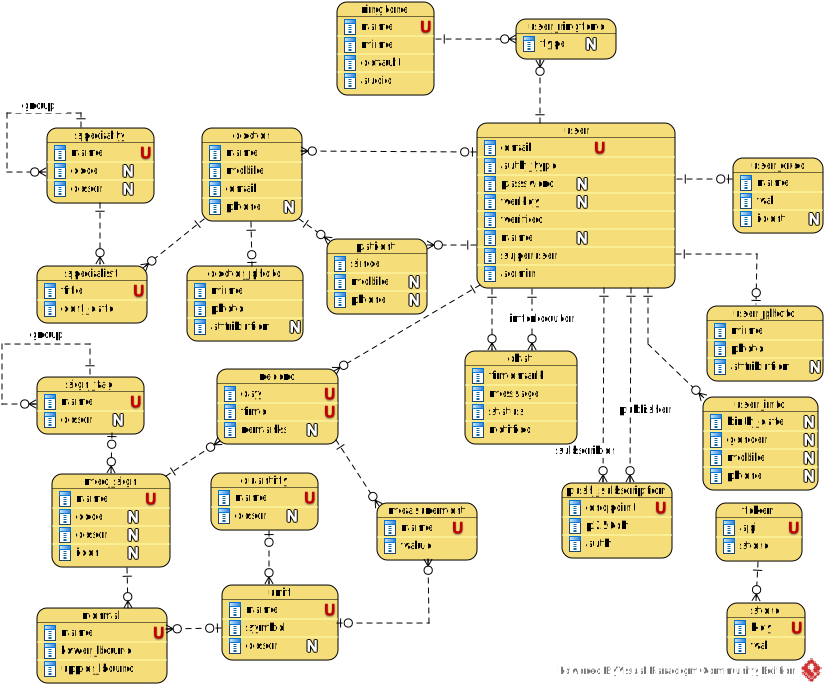
ER Diagram
Source code
Project repository on GitHub.
Issue tracking
Please note that the application currently running is a demo application. Any actions are allowed and encouraged. Report issues on GitHub.